Vocabulary learning, built into reading

Save the words you meet
while you browse.

Vocab helps you save, understand, and revisit useful words while you read the web — so vocabulary learning happens naturally, without interrupting what you're doing.

1 keystroketo save a word
Every pageyou read becomes practice
0 accountsneeded, ever
word-journal.html
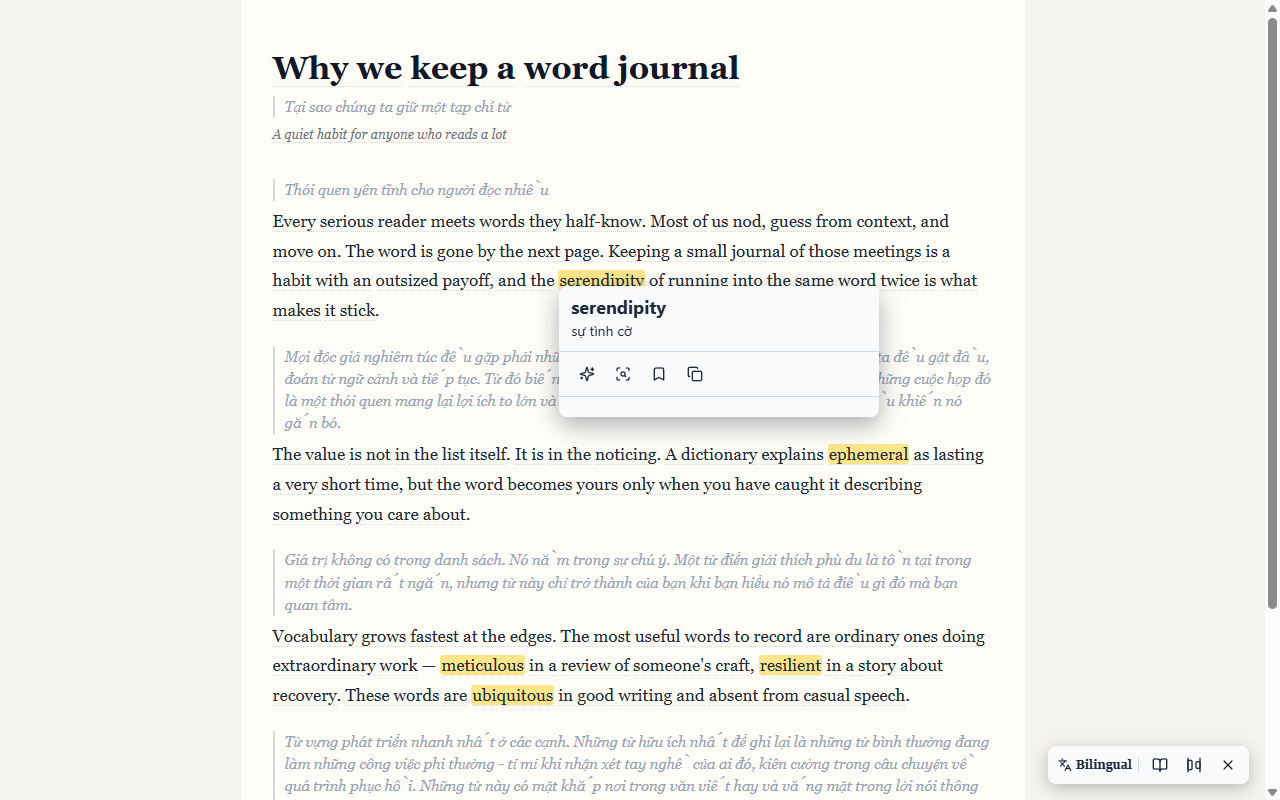
Vocab's selection card on a web page: the word 'serendipity' with its translation and Save action
The problem

You already read. Why not learn from it?

Articles, documentation, newsletters, forums — you meet useful words every single day. You look one up, understand it for a moment, and keep reading.

Read Look it up Understand Keep reading…

…and forget it five minutes later. Vocab closes that gap.

How it works

From “What does this mean?”
to “I know this word.”

The whole learning journey, inside the pages you already read.

01

Encounter

Meet an unfamiliar word while reading, on any site.

02

Understand

Get the meaning, translation, pronunciation, and examples — in context.

03

Save

Save it instantly, together with the sentence it came from.

04

Revisit

Vocab recognizes the word again on every page you visit.

05

Remember

Repeated exposure makes the word familiar — then yours.

What Vocab does

See Vocab working

Real screenshots from the actual extension — the words on this page are the ones Vocab learns from.

Save

Save a word without leaving the page.

Select any word or phrase and the Vocab card appears right where you're reading: the word, its translation, and one-click actions. Save it — with the sentence, the source, and a note — without copy-pasting into a separate vocabulary app.

Right-click, press Ctrl+Shift+S, or use the popup. One keystroke is enough.

Generate Save Copy
word-journal.html
Selecting 'serendipity' on a page opens the Vocab card with its translation and actions
Understand

Understand a word in context.

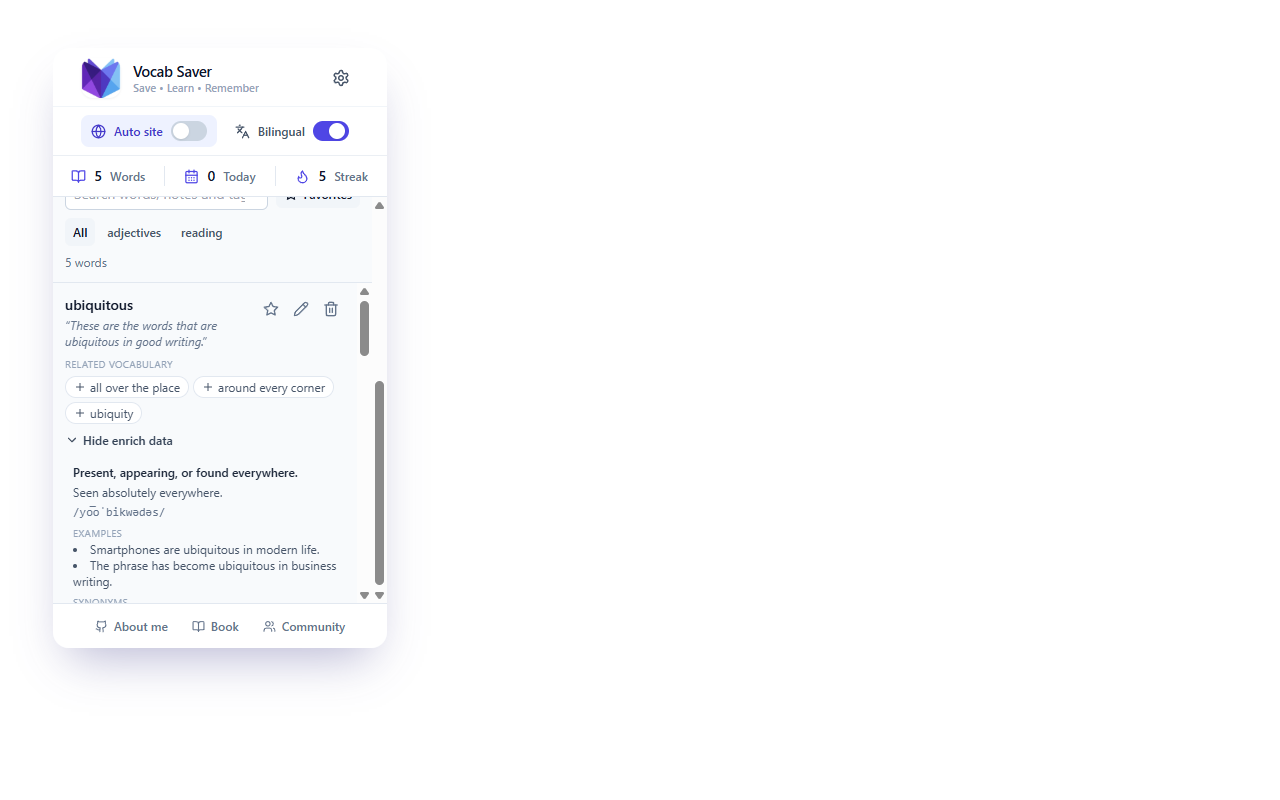
Don't just translate a word — understand how it's actually used. Vocab gives you the meaning, translation, IPA pronunciation with audio, part of speech, examples, synonyms, and a simple explanation, all built around the sentence you found it in.

One click generates the full enrichment for the word in front of you.

Translation Pronunciation Examples Synonyms
Vocab — library
The Vocab popup showing the full explanation for a saved word: meaning, translation, examples, and synonyms
Revisit

Your vocabulary follows you across the web.

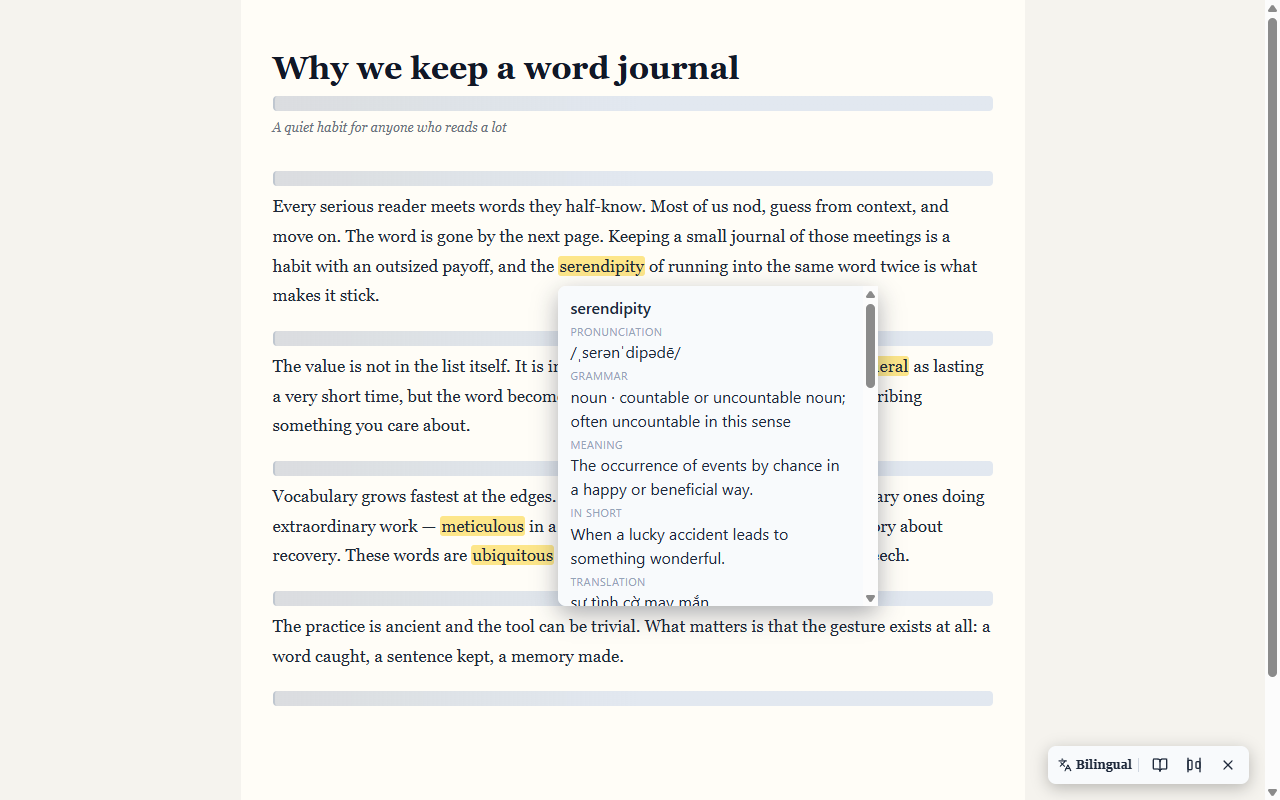
Once a word is saved, Vocab can recognize it whenever it appears again — on any page you visit — and highlight it for you. Hover a highlight to see the meaning, pronunciation, and the note you left.

Recall happens passively, as a by-product of reading.

On-page highlights Hover to review
word-journal.html
Saved words highlighted on a page, with the Vocab hover card showing meaning and pronunciation
Vocabulary Radar

Discover words you didn't know you were looking for.

As you save and enrich words, Vocab's Radar generates related vocabulary from them — synonyms, opposites, collocations, and word forms — each with a reason it's useful to you.

See a word you want? Save it and it joins your vocabulary. Your Radar grows as you learn.

Related words Why it's useful Save in one click

Saving a Radar word moves it into your vocabulary.

Bilingual reading

Read and learn at the same time.

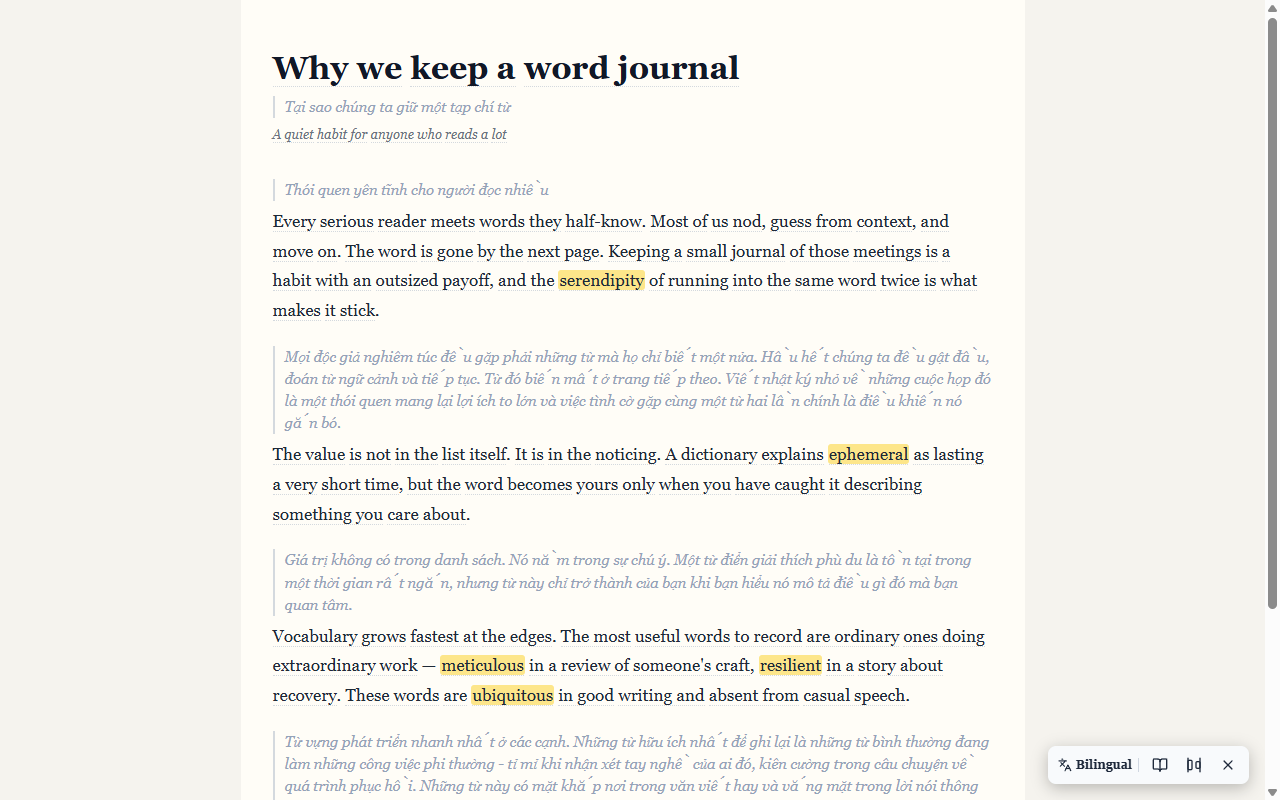
Turn any article into original + translation — side by side or stacked, with word-by-word glossing at your pace. A reading toolbar offers simplify, summarize, and explain actions right on the page.

Understanding stays effortless; useful words still find you.

Side-by-side Word or sentence depth
word-journal.html
The same article rendered in bilingual reading mode: original text next to its translation
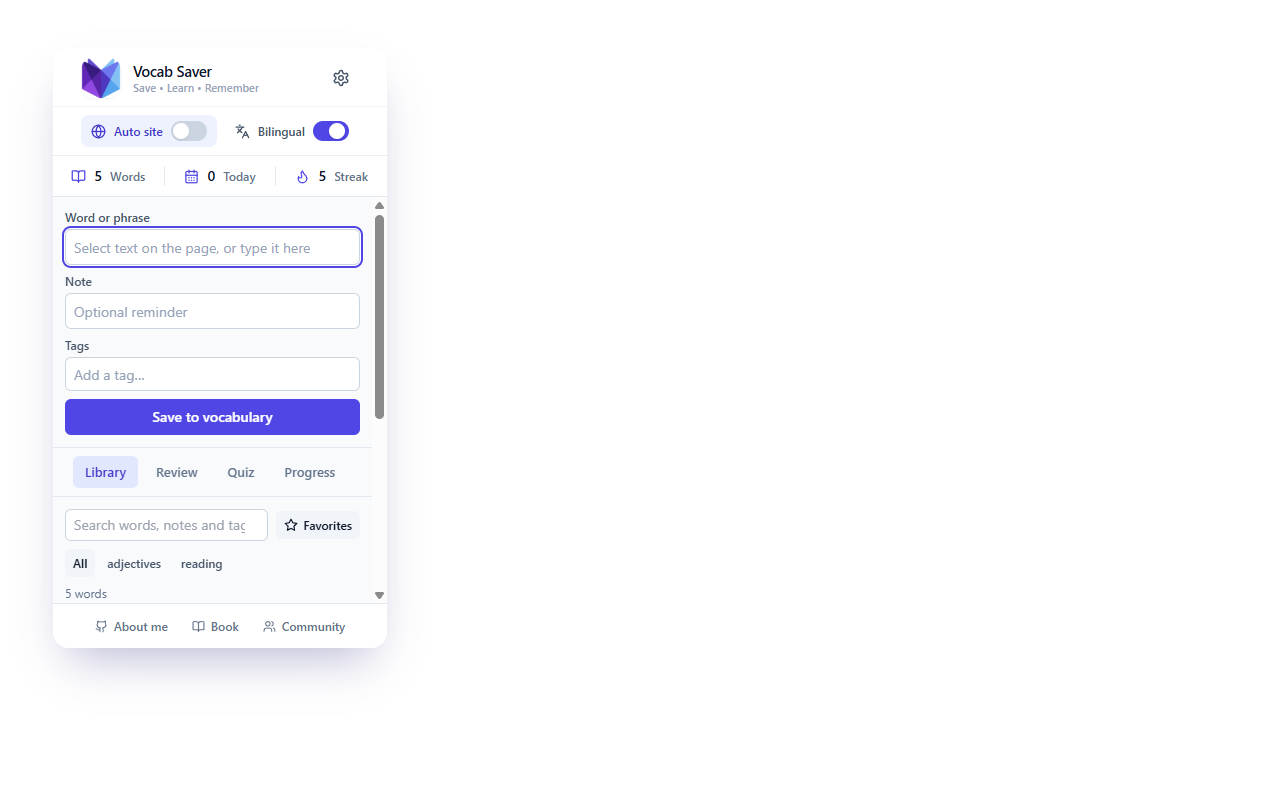
Your library

Build your personal vocabulary automatically.

Everything you save becomes your vocabulary collection: the word, its meaning, translation, pronunciation, and the sentence and source it came from.

Search, favourite, tag, and edit — all from the popup, without leaving what you're doing.

Search Favourites Tags
Vocab — library
The Vocab popup library: saved words like serendipity, ephemeral, and meticulous with their sentences
And everything around it

The details that make it stick

Review what's due

A spaced-repetition queue flips each due word and grades your recall — Again, Hard, Good, Easy.

Quiz yourself

Pick the right meaning from your own saved vocabulary, and watch your score grow.

Smart selection toolbar

Select any text to get a floating toolbar: explain with AI, translate, save, copy, or copy the source sentence.

X-Ray Reading

Highlight a whole sentence and look straight through it — structure, grammar, meaning, and why the writer wrote it that way, in any language.

On-page highlighting

Saved words are highlighted everywhere — even both columns of bilingual pages. Hover or focus to see the meaning.

Track progress

See your vocabulary grow over time in the Progress tab — every saved word counts.

Hear it spoken

Listen to any word in its own language with your browser's speech engine.

Portable vocabulary

Export your collection as JSON, or import existing words — merge or replace.

Works before setup

Saving, highlighting, and translation need no AI key and no account — just install.

Why Vocab?

The difference is friction.

Vocab removes the steps between encountering a word and actually learning it.

Dictionary

Search Read definition Leave Forget

Vocabulary app

Encounter Copy Switch app Save Study later

Vocab

Encounter Understand Save See it again

Learning happens where you're already reading — with nothing extra to do.

No study sessions. No stopping reading. No lists to build by hand. Just keep reading — Vocab turns the words you naturally meet into vocabulary you keep.

Optional AI enrichment

Deeper explanations, when you want them.

Vocab works with your preferred AI provider — OpenAI, OpenRouter, Google Gemini, Anthropic, and more — for richer explanations of the words you save. Bring your own key and stay in control. No key? Saving, highlighting, and translation work with none at all.

AI only runs when you ask for it.

See inside a sentence

X-Ray Reading, in your own language

Select a sentence and hit X-Ray Reading. Vocab lays the text open — its structure, the grammar that matters, the real meaning in context, and the choices the writer made.

  • Structure & clauses, shown without grammar jargon
  • Meaning, then a simpler version when it helps
  • Works in English, Vietnamese, Japanese, Arabic & more
  • CEFR difficulty estimate, so you know what to revisit
See it in the source
TIẾNG VIỆT

“Bản báo cáo mà ủy ban công bố hôm qua đã gây lo ngại sâu sắc.”

Core The report the committee released yesterday caused deep concern.
Structure Main clause + relative clause modifying “bản báo cáo”.
Why Front-loading the report makes it the topic of the sentence.
Simpler Hôm qua ủy ban công bố báo cáo. Nó gây lo ngại.
CEFR B2
Local-first by design

Your vocabulary stays yours.

  • Stored locally in your browser — no Vocab account, no backend
  • No centralized vocabulary database
  • AI requests only when you ask for them
  • Never sold, never used for advertising

Local-first, by design

Words, notes, and settings live in your browser's IndexedDB. Export them as JSON any time.

Read the Privacy Policy
Questions

Frequently asked questions

What is Vocab?

A Chrome extension that saves words while you browse, highlights them on the pages you visit, and helps you understand and remember them — no account required.

How does saving a word work?

Select any word or phrase and the Vocab card appears with its translation and a Save button. You can also right-click, press Ctrl+Shift+S (Cmd+Shift+S on macOS), or save from the popup. The sentence, source, and a note are stored with it.

Can Vocab highlight words I've already saved?

Yes. Saved words are highlighted wherever they appear on the pages you visit. Hover — or focus with the keyboard — to see the meaning, pronunciation, and your note.

What is Vocabulary Radar?

Radar generates related vocabulary from the words you save and enrich — synonyms, opposites, collocations, and word forms — each with a reason it's useful. Saving a Radar word adds it to your vocabulary.

Do I need an account?

No. Vocab has no account, no login, and no email required. Everything is stored locally in your browser.

Does Vocab work on any website?

Yes — Vocab runs on web pages you visit. Chrome's own pages (chrome://, the Web Store, and the built-in PDF viewer) are excluded by the browser itself.

What happens when I use AI enrichment?

When you ask for an explanation, the word and its context are sent directly to the AI provider you configured. AI only runs when you trigger it — saving, highlighting, and translation need no AI key at all.

Where is my vocabulary stored?

In IndexedDB in your browser profile, with settings in chrome.storage.local. There is no Vocab-operated backend.

Can I export my vocabulary?

Yes. Export your collection as versioned JSON and import it anywhere — with merge or replace options.

How do Review and Quiz help me remember?

Review shows a spaced-repetition queue of words due for practice and grades your recall. Quiz turns your saved vocabulary into quick multiple-choice questions. Both run entirely in the popup.

The next word you learn
is already on the page.

Install Vocab and turn your everyday reading into vocabulary practice.